Keep the details confidential. Keep the next step in view.
Keep confidential notes private to their author, with named sharing when needed. Review dated follow-ups beside your caseload, and prepare a separate update for teachers or families.
No credit card. Start with your own classroom or caseload.
Choose what is shared. Keep session details restricted.
Confidential notes start with their author. Share a saved note with named colleagues who already have student access, or prepare a separate update for teachers and families.
| Audience | What is available |
|---|---|
| Author and named recipients | Only the notes they are authorized to read. Confidential exports require Pro or school access and are audited. |
| Staff without named access | Session date or status when shared, and an optional progress signal. Counselor, administrator and owner roles do not grant automatic access to the note body. |
| Family & routine meeting packets | Confidential notes are excluded. Prepare a separate update for sharing; administrator access cannot force the confidential text into a packet. |
The notebook keeps it private. It also keeps it disconnected.
A separate notebook keeps nothing about the session beside the behavior chart, the accommodation log, or the family update the teacher is writing. In a shared system, check who can open the note and whether it is included in reports.
One record, with readers you choose by name.
A confidential note starts with its author. Share each saved note with named staff who already have student access when needed. A job title never opens every note, and ordinary meeting packets exclude confidential text.
Built for who sees what
What a counselor opens on a Tuesday, and what the rest of the building sees instead.
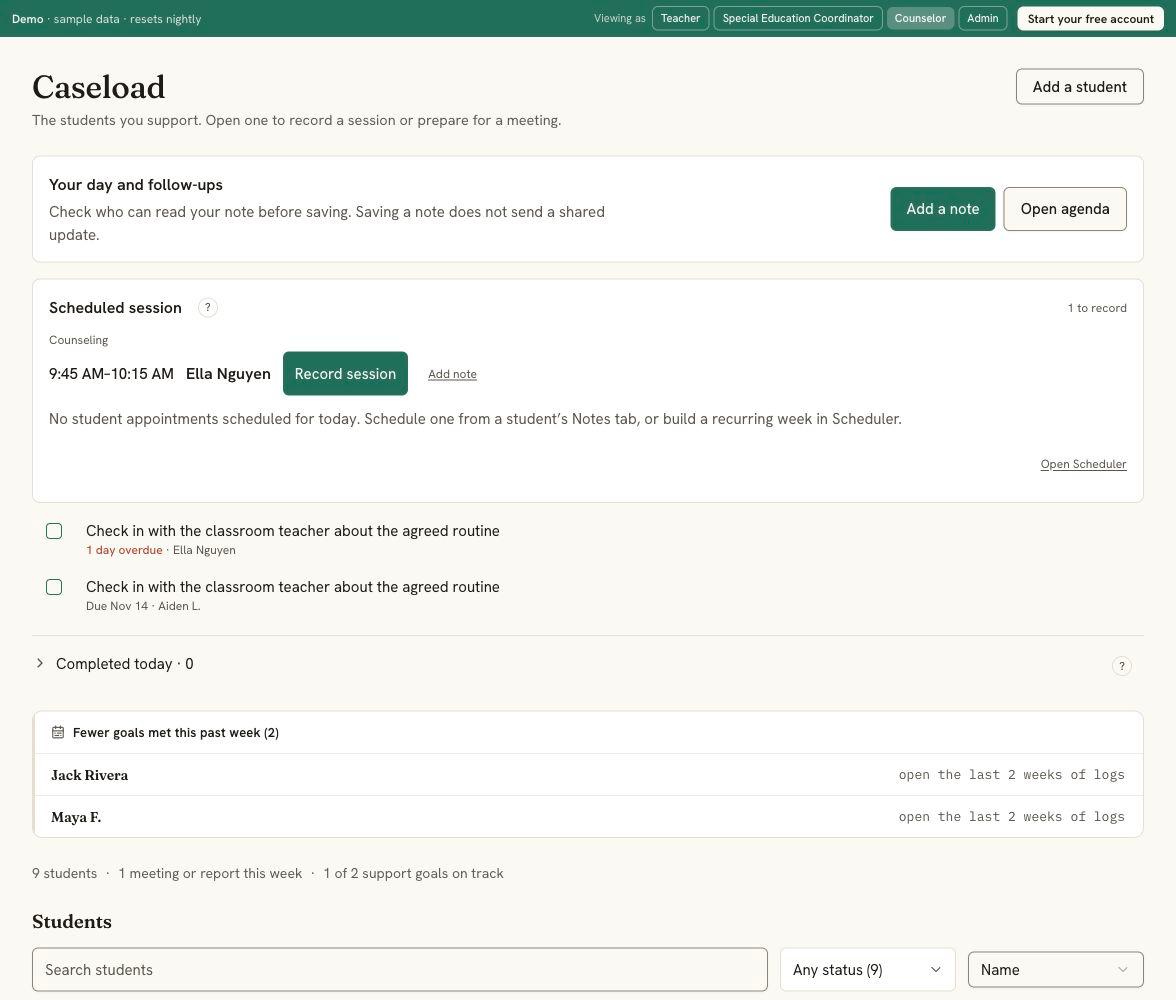
Your caseload, as a counselor sees it.
Today's sessions to log, your follow-ups with their dates, the students whose week dipped, and every student on the caseload with their next meeting or report. A session note stays separate from anything shared, and nothing here nags you to track a chart.
Take the counselor tour →01Fictional demo. Scheduled sessions and follow-ups sit above the caseload. The note is private. The session isn't a secret.
Share the session date or status without sharing what was said. That signal does not give anyone access to the confidential narrative. Named note readers and confidential exports are checked separately.
02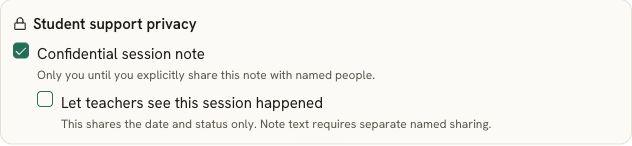
Fictional demo. Note text and session-status sharing are separate choices. Enlarge to read the controls. One timeline. Your layer on top.
Your confidential notes remain connected to the student record. The author and explicitly named recipients can read them while they retain student access. Confidential text stays out of ordinary parent, MTSS and IEP packets.
03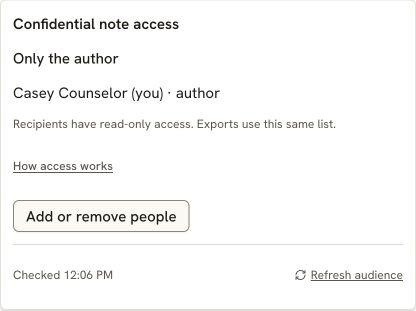
Fictional demo. Each saved note shows its own current readers. Sessions and small groups that fit the day.
Enter each student's minutes and the classes they can't miss. Caseload Calendar places individual sessions and small groups in the gaps, and flags planned minutes that could not be placed. Free for 5 scheduled students; $39 a year for an unlimited caseload, yours, not a school purchase.
How the counselor scheduler works →04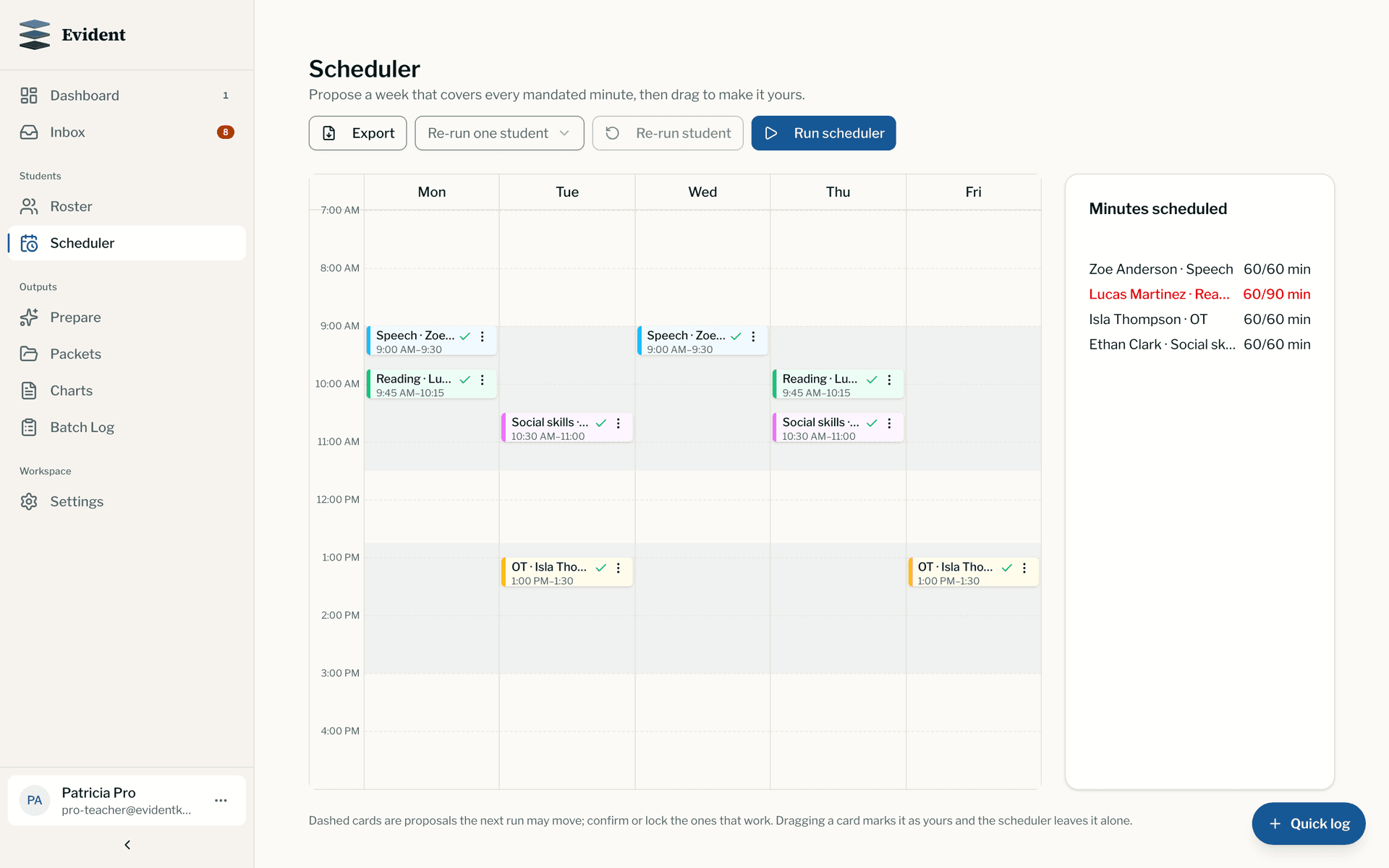
Also included
- Authorized confidential exports. With Pro or a school plan, export the confidential notes you are allowed to read. The export is audited; free PDF and referral credits do not cover it.
- Family requests as follow-ups. A request from the family becomes an assigned, dated follow-up with the contact recorded, so nothing waits in an inbox.
- Notifications that fit. One dot, not a count, and a mute per kind.
- Check-in, check-out. The daily check-in layout opens in the free chart maker, with no account needed to print.
- The same record teachers already use. Daily notes, behavior charts, and the family portal in 28 languages, with your confidential layer on top rather than in a second system.
- Documents on the record. A plan or an assessment on the student's page with a review date, and a Needs a look row when it passes.
Student data stays safe, and stays yours.
Plain promises, each one backed by how Evident is built.
- EncryptedStored and sent
Student records are encrypted where they're stored and on the way to your screen.
- Never soldTo anyone
Not in any form. Our agreement with your school says so in writing.
- No adsNo marketing
No advertising in Evident and no student information used to target advertising.
- Never trains AINames removed first
Names are removed before text is sent to a model. AI writing starts from your recorded evidence; you review and edit the draft before sharing. It stays off unless your school turns it on.
- LockedTo the right people
Staff see only the students shared with them, in the role they were given. The system enforces it, not just the screen.
- 24 hoursTo tell your school
We notify your school within 24 hours of becoming aware of a breach affecting its data.
Download it anytime. Export permitted records with the appropriate plan or allowance. Organization owners can export school records; confidential notes keep their own access rules.
Delete it anytime. Manage records within your permissions. Agree school-owned record retention and staff departures with your school; see our published deletion policy.
See who looked. Confidential note access and exports are audited. Authorized school staff can review the audit trail.
- FERPA-conscious workflows
- DPA & NDPA ready for districts
- No government ID numbers, birthdates, or home addresses
- Two-step sign-in
- Every company that touches the data, listed publicly
Read our 12 student privacy commitments →Security overview →
Common questions
Where should a school counselor keep confidential notes?
Keep them connected to the student record with explicit access controls. In Evident, confidential notes start with only their author. The author can share an individual note with named staff who already have student access. Ordinary meeting packets exclude confidential text, and confidential reads and exports are audited.
Can an administrator read a counselor's confidential notes?
An administrator or organization owner gets no automatic access and has no role-based override. The author can explicitly share an individual saved note with a named staff member who already has access to that student. Sharing session date or status alone does not share the narrative.
Do confidential notes end up in parent or MTSS packets?
Confidential session notes stay out of routine parent, MTSS, and IEP packets. To share an update, prepare a separate note for that audience and review it before publishing. Staff-only material is blocked from family packets.
What does the caseload page show?
The students on your caseload with their next meeting or report date, your own status for each, a Needs a look count, and the ones with nothing recorded in a while. A session note connects to its own dated follow-ups, without copying the confidential text or implying a message went to the family. The chart-tracking tools a classroom teacher uses are not in your sidebar.
How does the scheduler handle small groups?
Students with the same service, overlapping free time, and grades within two levels are grouped automatically up to the size you set, placed in the gaps between each student's do-not-pull times. When the overlap disappears, the group splits back into sessions that fit.
What does it cost for one counselor?
The confidential notes, the caseload and the daily record are on the free plan, which covers 30 students and does not expire. Caseload Calendar is free for 5 scheduled students and $39 a year for an unlimited caseload. Neither needs a school purchase.
Is this a safeguarding or case-management system?
No. Evident documents day-to-day student-support work: sessions, check-ins, small groups, and the notes around them. Statutory safeguarding case management stays in the system your district designates for it.
Further reading: where school counselors should keep notes, confidential notes without a second system, and the school counselor scheduling guide. The full role matrix is on the confidential student support page for your administrator.
Either door opens onto the same record.
Import your caseload, paint your availability, and let the scheduler place the week. Or log the first confidential check-in today and add the schedule when January comes.
Free for 30 students. Unlimited scheduling is $39 a year, yours, not a school purchase.
See how your team uses the same record.
Teachers
Daily goals, useful observations, and family updates that fit the school day.
Special education case managers
Measured progress, team contributions, and review dates across your caseload.
MTSS coordinators
Review the support delivered alongside the progress measured, then record the next decision.
School & district leaders
Find records that need attention and follow through with the team responsible.
Behavior analysts
Staff instructions, attributed observations, and reviewed program changes.