For schools making data this year's focus
Collect it once. See the whole school.
Teachers track goals and notes in the classroom as they happen. The team reads the same students across rooms, the school sees who is covered and who needs a look, and families see what you choose to share.
- 30students per teacher on the free plan, a whole class
- 10staff seats on Support Team, $1,800 a year, by card or invoice
- 28languages for family updates, the portal, and packets
- 0parent logins, apps, or accounts required
Only for the special education rooms? No.
Any teacher tracks a whole class free: charts, daily marks, notes, Batch Log, the family portal. Nothing about that changes when the school buys a license.
For the team that shares the same students.
The special education teachers, the paras who record, the counselor, the interventionist, the coordinator. In most buildings that is a handful of people, and Support Team is sized for exactly that. If the whole building joins later, the license credits toward the larger plan.
What a school gets
The same record, with the right view for each person in the building.
See every student in the school on one page.
Student Overview lists each student with goals met, family signatures, days tracked, and the trend, filtered by grade, teacher, time range, or goals met, and exported to a spreadsheet. The administrator's home adds who recorded this week, who went quiet, and each teacher's coverage, without opening a single note.
Take the administrator tour →Principal and administrator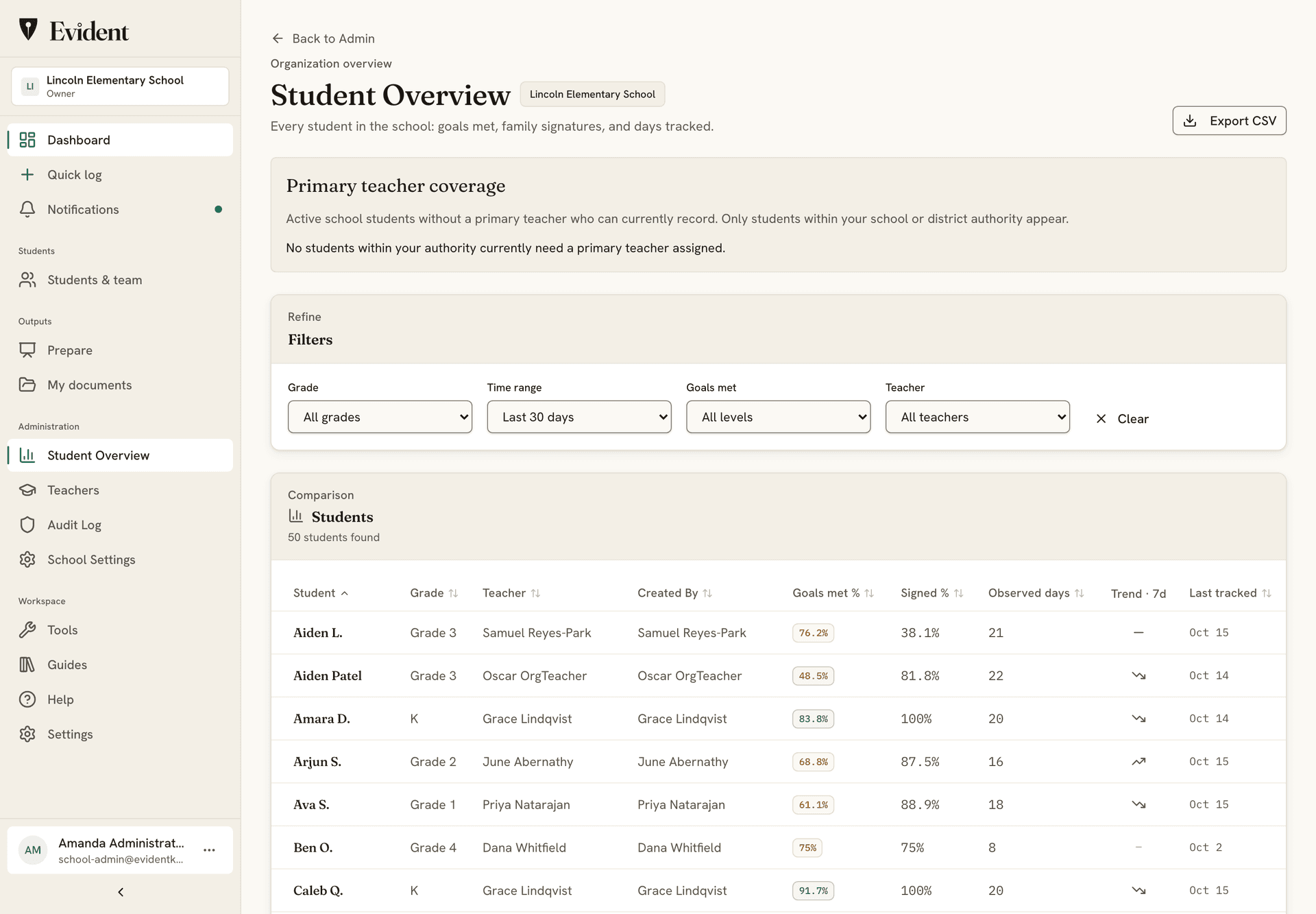
Classes on the roster, in the teacher's own colors.
Each teacher keeps classes on the roster and adds students from one bar. Every student shows who tracked them last, the days tracked, and the next meeting. Bulk actions for the whole class are free, and a student's name opens their page.
Classroom teachers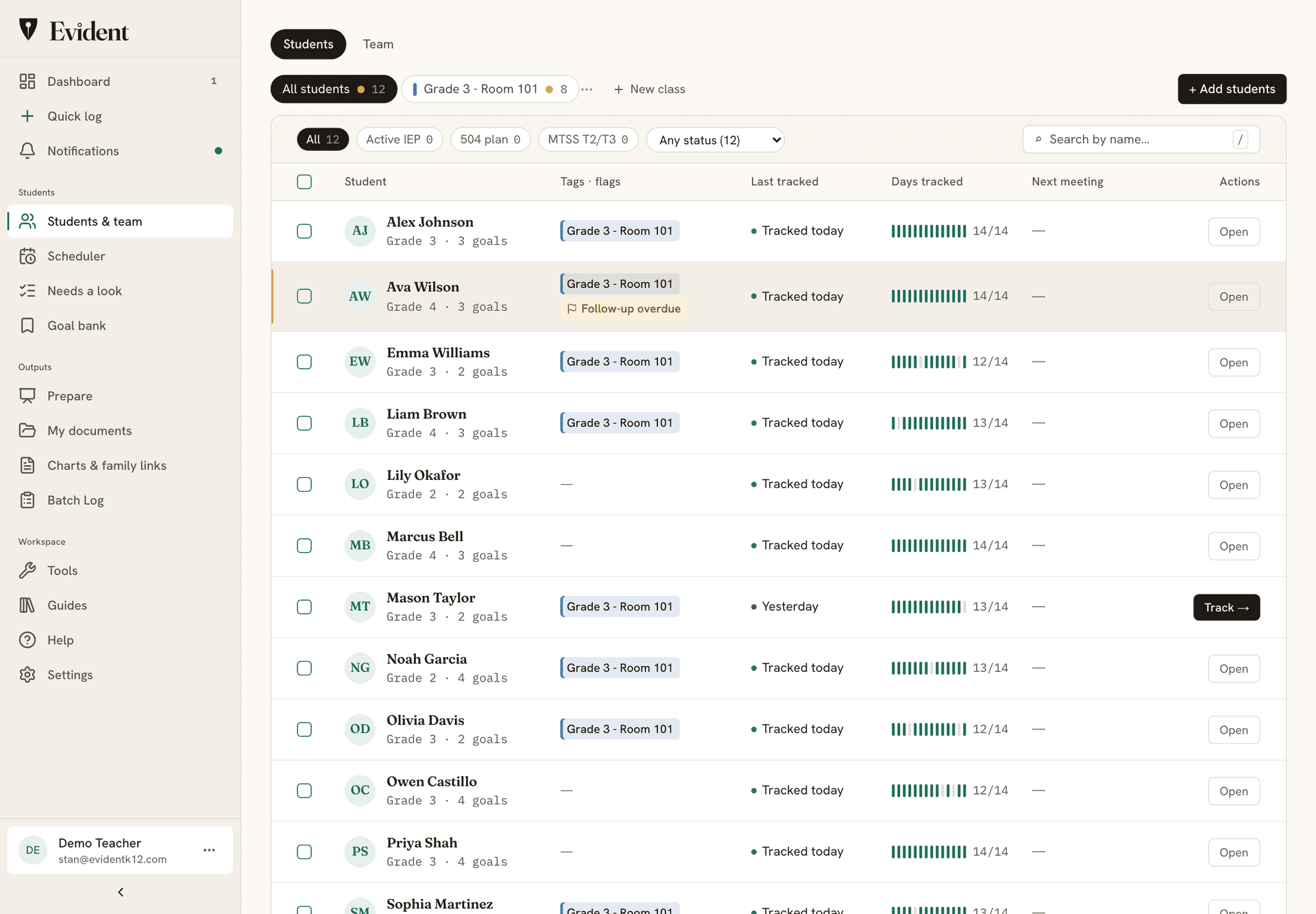
A team, not a shared spreadsheet.
The Team view shows everyone on a teacher's students and what each can do: edit the plan, record data, or view only. The principal reads; the para records; the co-teacher edits. A colleague without an account gets an invitation. The records stay the school's when staff change.
The team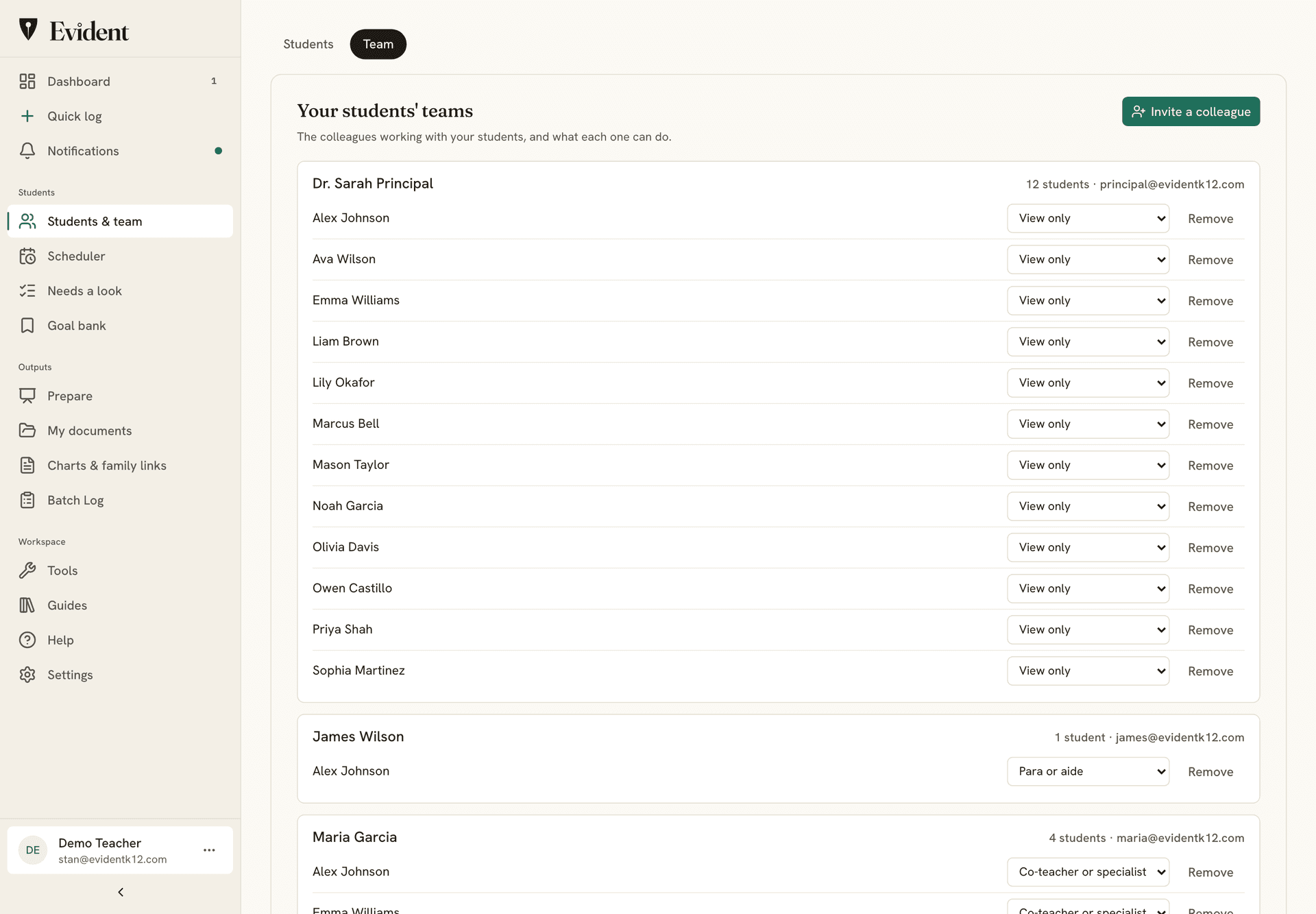
Record the class in one pass.
Batch Log puts every student's goals for today on one page: Met, Not yet, or No opportunity for each, saved as you tap, with the signed days locked. The class report prints the whole roster's trends from the same records. Both are on the free plan, for every teacher in the building.
Classroom teachers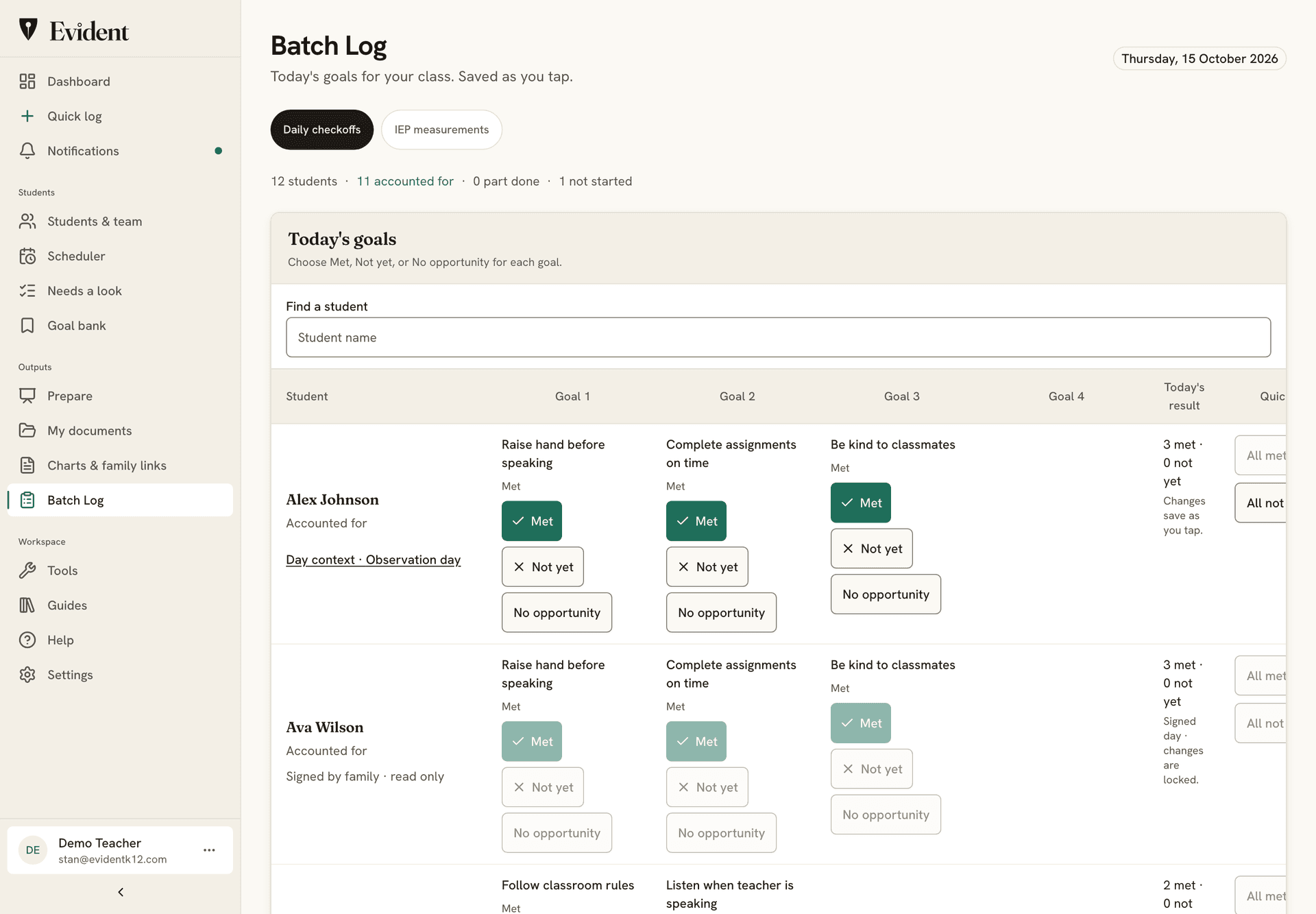
Counselor notes stay private.
A counselor's session notes are private to the student support team. If the counselor chooses, teachers can see that a session happened and its status, never what was said. Private notes stay out of reports and packets, and every time one is opened, it's recorded.
Evident for school counselors →Counselor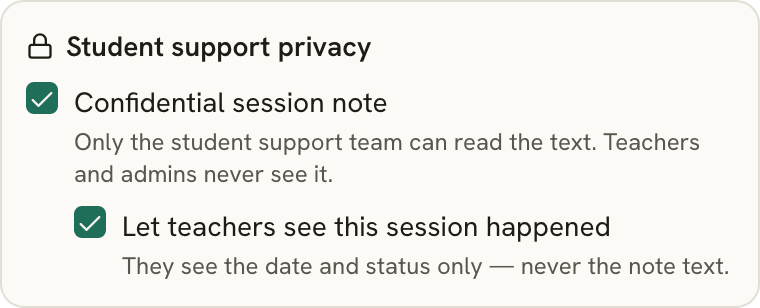
Also included
- Roles. Owner, administrator, principal, teacher, para, counselor, and specialist, each seeing what the role allows. The system enforces it, not just the screen.
- Meeting packets. Prepared in three steps for an IEP review, an MTSS meeting, or a conference, built from the records, checked by the team, translated for the family on the way out.
- The plan on the record. Support plans, meeting notes, and assessments on the student's page with review dates, and a Needs a look row when one passes.
- The audit log. Every change and every opened private note, dated and attributable, read by the school and never edited.
- Notifications that fit. One dot, not a count, and a mute per kind, so a principal hears about meetings and not every mark.
- The end-of-day reminder. At each teacher's own hour, on school days only: what was recorded today and what was not. No names in the email.
- Caseload Calendar. A weekly grid of sessions, so every student gets their service minutes.
- Procurement. Purchase orders and invoices, a signed DPA on every school plan, SSO sign-in and CSV import. Procurement packet, DPA and NDPA
Student data stays safe, and stays yours.
Plain promises, each one backed by how Evident is built.
- EncryptedStored and sent
Student records are encrypted where they're stored and on the way to your screen.
- Never soldTo anyone
Not in any form. Our agreement with your school says so in writing.
- No adsNo marketing
No ad networks, no tracking pixels, nothing marketed to students or families.
- Never trains AINames removed first
Names are removed before any text leaves for a model. It can only reword what you recorded, not write from a blank prompt, and it cannot add a measurement. And it stays off unless your school turns it on.
- LockedTo the right people
Staff see only the students shared with them, in the role they were given. The system enforces it, not just the screen.
- 24 hoursTo tell your school
If something ever goes wrong, we tell your school within a day of learning about it.
Download it anytime. Export any student's record as a PDF, or the school's records as a file.
Delete it anytime. Remove a student or an account yourself. It's gone from backups within 30 days.
See who looked. Every change, and every opened private note, is logged. The log can't be edited.
- FERPA-conscious workflows
- DPA & NDPA ready for districts
- No government ID numbers, birthdates, or home addresses
- Two-step sign-in
- Every company that touches the data, listed publicly
Read our 12 student privacy commitments →Security overview →
Common questions
Is Evident only for special education rooms?
No. Any teacher can use the free account for a whole class of up to 30 students: goal charts, daily tracking, Batch Log, the family portal, and printable sheets. The school license is for the team that supports the same students across rooms: special education, counseling, MTSS, interventionists, and the coordinator. Support Team covers 10 of those staff for $1,800 a year, and most schools fit in it.
What does "data" mean here?
Dated, attributable records of what happened with a student: a goal measured the way the goal calls for, a behavior logged with its antecedent and consequence, an accommodation delivered and rated, a teacher's observation, a family's signature or reply, a plan on file with its review date. Numbers where a number is the right record, words where it is not, every one with a date and an author.
Our teachers already use the free version. Do they lose it when the school buys a license?
No. Classroom tracking stays free, including Batch Log and bulk roster actions. A school license adds the shared layer on top: the team sees across classrooms, staff get roles, administrators get the whole-school view and the audit trail, and documentation outputs (PDF reports, packets, CSV export) are included for every seat. Records made on the license belong to the school and stay when a teacher leaves.
We have a data wall in the hallway. Is that a problem?
A wall that identifies students by name or by a decodable code, where other students and visitors can read it, is a FERPA question for the school. Evident keeps the same view private and role-based: the team sees it, families see their own child, and nobody else sees anything. Read the data wall guide on the blog for what to keep and what to take down.
How long does setup take?
Support Team needs no sales call: create the school, invite staff by email with a role, import students by CSV or Google sign-in. A team is tracking the same day. Foundation and larger plans include guided onboarding with a named contact.
What about privacy and procurement?
Evident is designed for FERPA-conscious student-support workflows. Schools remain responsible for their own FERPA obligations, and Evident supports those workflows with role-based access, parent visibility controls, audit logging, data export/delete workflows, and signed DPAs where appropriate. Purchase orders, invoices, and a signed DPA are supported on every school plan, and the procurement packet has the security and data-handling detail a review needs.
Reading on the initiative itself: what to collect when data is the year's focus and what to do about the data wall.
Put the record where the team can read it.
Support Team: 10 staff seats, $1,800 a year, by card or invoice. Classroom tracking stays free for every teacher.
Access and privacyProcurement & billing docsEvident for your district